
Download ActiveXplorer – Free Windows Tool for ActiveX & DLL Management
ActiveXplorer is a powerful yet lightweight software utility designed specifically for Windows users who frequently encounter ActiveX control installation issues, missing DLL files, or registration errors. This free tool helps developers, IT professionals, and advanced users identify, locate, and register ActiveX components and DLLs with precision. Whether you're troubleshooting legacy applications or managing system-level components, ActiveXplorer simplifies the process of diagnosing and resolving component-related problems.
With a stable release history and over 169,000 downloads since 2006, it remains a trusted choice for Windows system maintenance. Despite its age, ActiveXplorer continues to be relevant, especially in environments still relying on older Windows systems like Windows 95, 98, and ME. The tool is available in English only and is compatible with older operating systems, making it ideal for preserving legacy software functionality.
Its compact size and efficient performance ensure it doesn’t burden your system while delivering robust diagnostic capabilities.
Key Features of ActiveXplorer
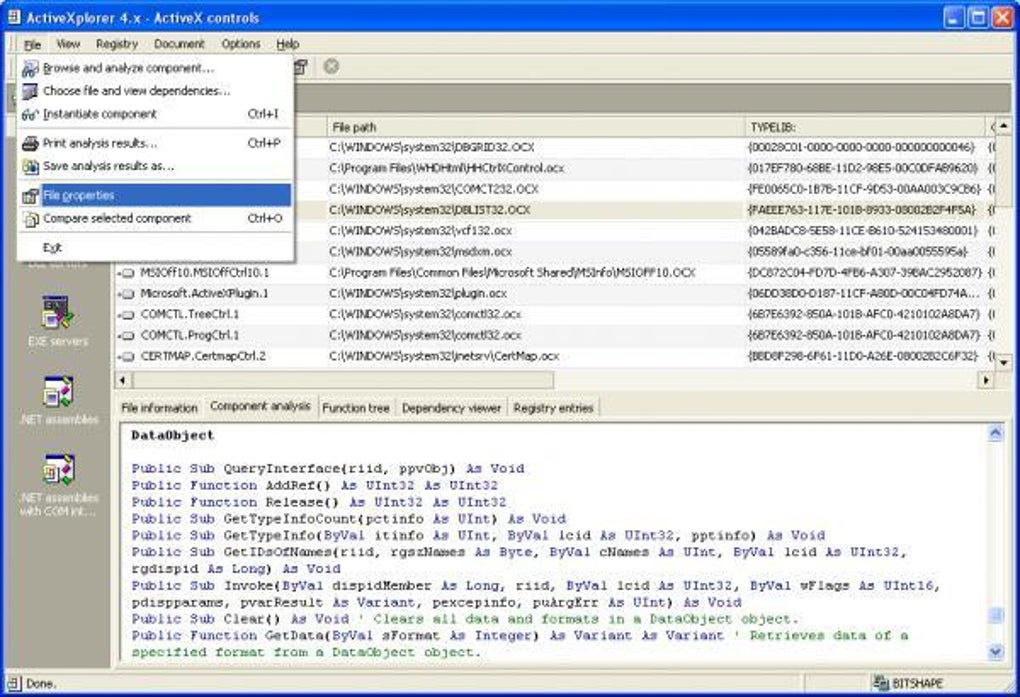
ActiveXplorer stands out in the realm of Windows system utilities due to its specialized focus on ActiveX and DLL management. One of its most valuable features is its ability to scan your system for all registered ActiveX controls and DLL files, displaying them in a clear, hierarchical tree structure. This visual representation makes it easy to locate specific components, especially when troubleshooting software that fails to load due to missing or corrupted files. The tool allows you to manually register or unregister components directly from the interface, eliminating the need to open the command prompt or use regsvr32 manually.
Another standout feature is its file search function, which enables users to locate missing or misplaced DLLs across the entire system. This is particularly useful when an application crashes with an error like “File not found” or “Cannot register component.” ActiveXplorer also provides detailed metadata for each component, including file paths, version numbers, and CLSIDs (Class Identifiers), which are essential for advanced troubleshooting. The tool supports batch operations, allowing you to register multiple files at once, saving time when managing large software packages.
Additionally, ActiveXplorer includes a built-in dependency viewer that shows which applications or services rely on specific ActiveX controls. This helps prevent unintended consequences when unregistering components. The software also logs all actions performed, which is invaluable for auditing or rollback purposes. With its intuitive interface and minimal system footprint, ActiveXplorer is a must-have for anyone managing legacy Windows environments, developers working with COM-based applications, or IT administrators maintaining older systems.
Installation & Usage Guide for ActiveXplorer
Installing ActiveXplorer is straightforward and requires no complex setup. Since it's a portable tool, you can simply download the executable file from a trusted source, extract it to a folder of your choice (like C:\Tools or your desktop), and run it directly. No installation wizard or system modifications are required—just double-click the .exe file to launch the application. This makes it ideal for use on locked-down workstations or shared computers where installing software is restricted.
Upon launching, ActiveXplorer presents a clean interface with a tree view on the left and detailed information panels on the right. The main window displays all registered ActiveX controls and DLLs organized by category. To begin troubleshooting, click on “Scan System” to initiate a full scan of your system’s registry and file system. The scan typically completes in seconds, even on older hardware. Once complete, you’ll see a list of all components, each with its name, file path, and registration status.
To register a missing or unregistered component, navigate to the file in the list, right-click it, and select “Register.” The tool will automatically invoke regsvr32 in the background and confirm success or failure. For unregistration, use the “Unregister” option. If you're unsure whether a component is safe to remove, use the “Dependency Viewer” to see which applications depend on it. Always back up your registry before making changes, especially when modifying system-level components.
Compatibility & System Requirements
ActiveXplorer is specifically designed for older Windows operating systems, including Windows 95, 98, ME, and earlier versions. It is not compatible with modern Windows versions like Windows 10, 11, or Windows Server editions. This limitation is due to architectural changes in newer Windows releases, particularly in how the registry and COM (Component Object Model) system are managed. However, for users still running legacy systems—common in industrial automation, medical devices, or older enterprise environments—this tool remains a reliable solution.
Despite its age, ActiveXplorer continues to function well on older hardware. It requires minimal system resources, with a footprint of less than 1 MB, making it suitable for machines with limited RAM and storage. The software is distributed as a single executable file, ensuring portability and ease of deployment. It supports both 32-bit and 16-bit DLLs, which is critical for compatibility with older applications. While it's only available in English, the interface is simple enough that language barriers are minimal.
For users who need a modern alternative, consider tools like Microsoft's Dependency Walker or Dependency Walker (open-source version), though these lack ActiveXplorer’s direct registration capabilities. If you're working in a controlled environment with older systems, ActiveXplorer remains one of the few tools that offer both scanning and registration in a single package.
Pros and Cons of ActiveXplorer
- Pros:
- Lightweight and portable – no installation required
- Efficient scanning of ActiveX and DLL components
- Direct registration and unregistration via GUI
- Supports legacy Windows systems (95, 98, ME)
- Provides detailed component metadata and dependencies
- Free to download and use
- Compact size – under 1 MB
- Cons:
- Not compatible with Windows 10/11 or newer
- Only available in English
- Outdated interface – lacks modern design elements
- No automatic update feature
- Not suitable for new development or modern COM applications
Frequently Asked Questions (FAQ)
-
Is ActiveXplorer free to download and use?
Yes, ActiveXplorer is completely free to download and use. It is distributed as a trial version, but no registration or payment is required. The software is ideal for users who need a reliable tool for managing ActiveX and DLL components without cost.
-
Can I use ActiveXplorer on Windows 10 or Windows 11?
No, ActiveXplorer is not compatible with Windows 10 or Windows 11. It was designed for older Windows systems like Windows 95, 98, and ME. Due to significant changes in the Windows registry and COM architecture, the tool cannot function properly on newer operating systems.
-
How do I register a missing DLL using ActiveXplorer?
To register a missing DLL, open ActiveXplorer, click “Scan System,” locate the DLL in the list, right-click it, and select “Register.” The tool will handle the registration process automatically. If successful, you’ll see a confirmation message.
-
Is ActiveXplorer safe to use?
Yes, ActiveXplorer is safe to use when downloaded from trusted sources. It doesn’t install additional software or modify system files beyond what’s necessary for component registration. However, always back up your registry before making changes, as improper unregistration can break applications.
-
Can I run ActiveXplorer from a USB drive?
Absolutely. Since ActiveXplorer is a portable application, you can copy the executable to a USB drive and run it from any Windows 95–ME machine. This makes it ideal for on-the-go troubleshooting or system recovery tasks.
Conclusion & Final Thoughts
ActiveXplorer remains a niche but powerful tool for managing ActiveX controls and DLLs on legacy Windows systems. While it’s no longer updated and lacks compatibility with modern operating systems, its reliability, lightweight design, and direct registration capabilities make it a valuable asset in environments still relying on older technology. For developers, IT support teams, or system administrators maintaining legacy applications, ActiveXplorer offers a simple, efficient solution to common component issues.
If you’re working with Windows 95, 98, or ME, and need a secure, free tool to scan, register, or troubleshoot ActiveX and DLL files, ActiveXplorer is worth downloading. Its long-standing reputation and high download count (over 169,000) are a testament to its effectiveness. Though it may not suit modern users, it fills a critical gap in older system maintenance.
Download ActiveXplorer today and take control of your system’s ActiveX components—free, secure, and hassle-free.







